How to Add Knowledge to your Shopify Chatbot
Learn how to enhance your Shopify chatbot with Flyweight AI. Discover how additional content, metafields, and order comments significantly improve your AI chat assistant and agent performance.

Optimize Your Shopify Chatbot with AI: How to Get the Most Out of Flyweight
For your Shopify AI chatbot to give great answers, it needs one thing most: context. The more relevant information your store gives it, the better your AI assistant can help customers, drive sales, and handle support in chat.
In this article, we’ll walk through three practical ways to add more knowledge to Flyweight AI - cleanly, in the right place, and without extra complexity.
1. Automatically Use All Public Store Content
Flyweight AI automatically reads all public content in your Shopify store, including:
- Product pages
- Pages
- Blog articles
- FAQs
- Policies
- Any other publicly accessible content
This data refreshes automatically every 24 hours.
What does that mean for you?
- Create a new product page → The AI picks it up within 24 hours
- Add new FAQs → The chatbot can answer them
- Update product details → Answers get more precise
👉 Important: The more high-quality content you keep up to date in your store, the better your AI chatbot performs.
More context = better answers = more conversions.
2. Add Extra Content with the Flyweight Content Metafield
One question comes up a lot:
"How can I add additional information without placing it directly in visible content?"
The answer: the Flyweight Content metafield.
It lets you store extra information just for the AI, without showing it to customers.
Supported Objects
The Flyweight Content metafield currently works with:
- Products
- Pages
- Blog posts
- Orders (
flyweight_content)
How to Create the Metafield
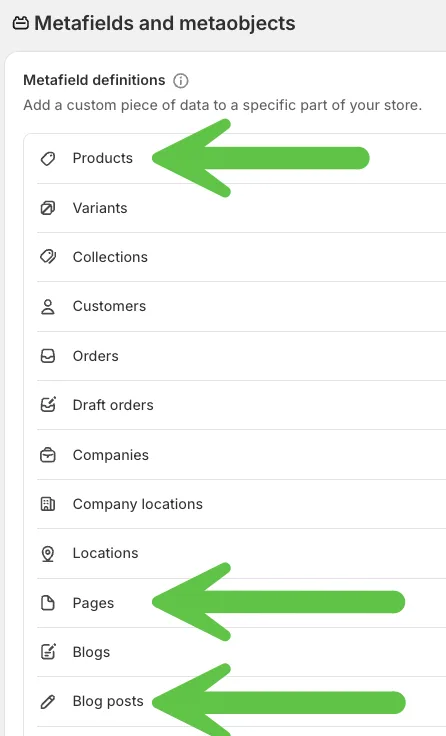
- Go to Settings → Metafields in Shopify
- Create a new metafield definition for Products, Pages, and Blog posts
- Name:
Flyweight Content - Namespace/Key:
Flyweight_Content - Type: Multi-line text
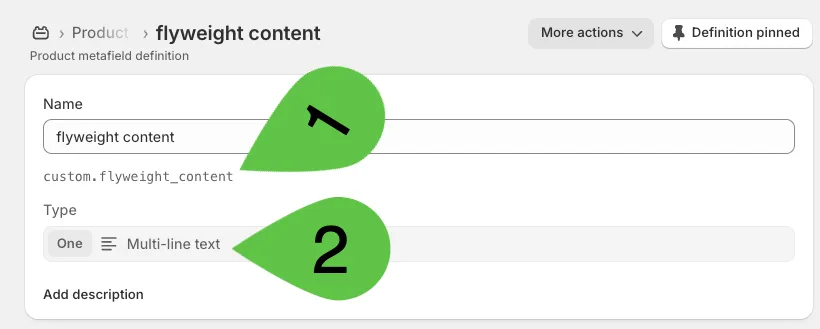
That’s it. You only need to set it up once.
How to Use the Metafield in Practice
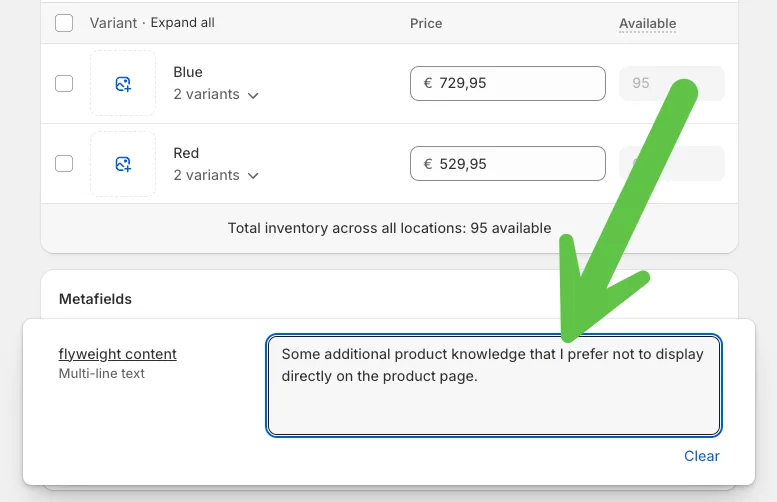
Once it’s set up, the new field appears at the bottom of, for example, a product page in the Shopify admin.
You can use it to add extra details like:
- Instruction manuals
- Internal background information
- Technical specifications
- Specific sales arguments
- Individual notes
For products, pages, and blog posts: During the next 24-hour refresh cycle, this content is automatically added to the AI backend.
Your Shopify chatbot can then use that information directly in chat.
Best Practice: Store Information at the Object Level
A common mistake: adding product-specific information to a general FAQ page.
The issue: the information is too far away from the actual product. The AI may not reliably understand that it’s directly relevant.
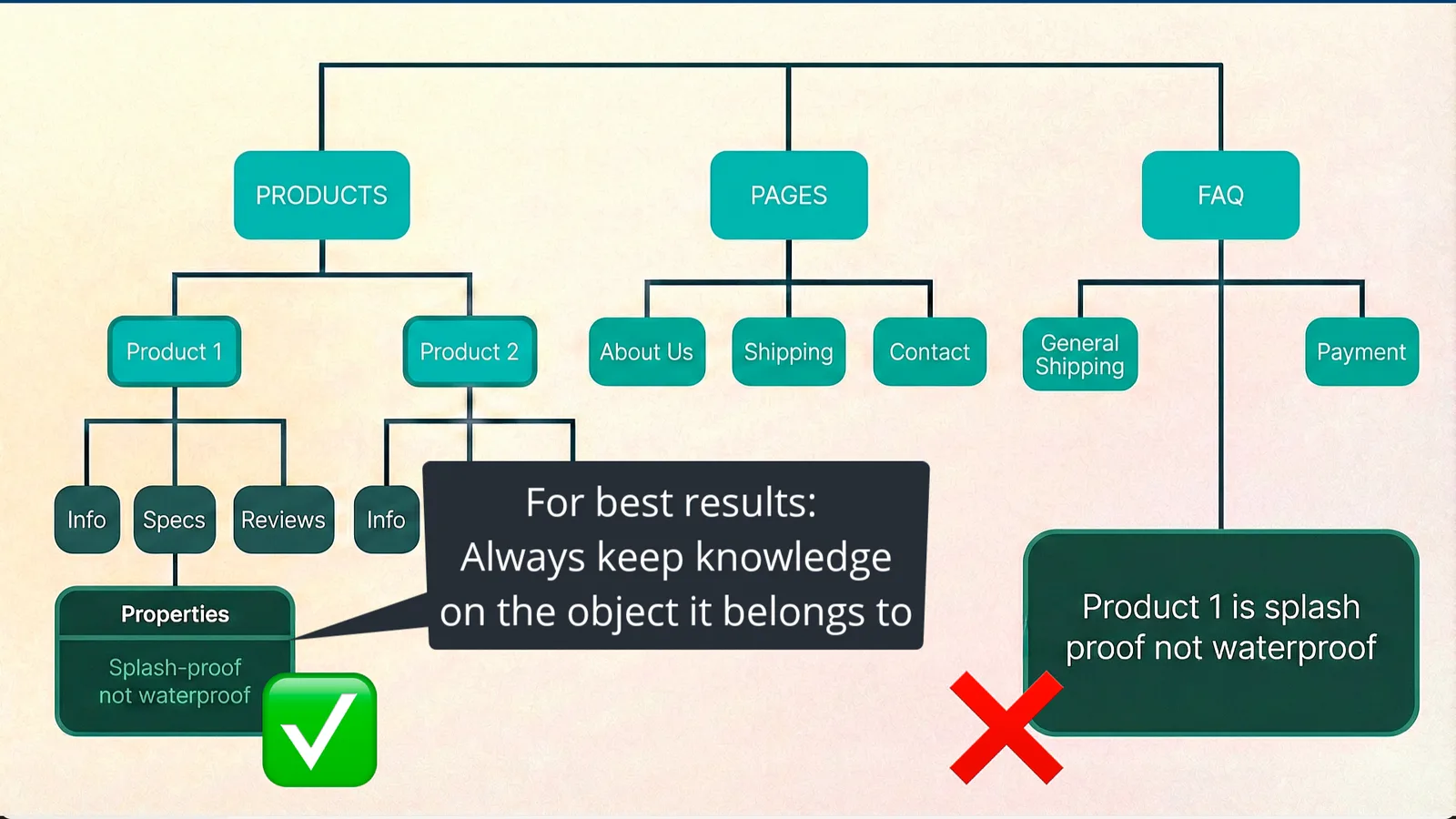
Better approach: Add that information directly:
- On the relevant product page
- Or in the product’s Flyweight Content metafield
That makes it clear to the AI agent which object the information belongs to.
The result: much more precise answers in chat.
Related: Want to exclude certain content from your AI chatbot? Learn how to exclude knowledge from your AI Chatbot for Shopify.
3. Add Order Details with Timeline Comments or a Metafield
Give the AI the order details your customers need, including information from an external system. Timeline comments and the flyweight_content order metafield are read live when a customer asks about their order, so the AI can include the latest saved details in its response without waiting for the 24-hour content refresh.
- Timeline comments: Add a comment starting with
#flyweightto the order’s Timeline in Shopify. - Order metafield: Create a definition once for Orders in Shopify’s metafield settings. Use namespace
custom, keyflyweight_content(full identifier:custom.flyweight_content), and type Multi-line text. No#flyweighttag is needed in this field.
Populate the metafield manually or from your external system with the estimated ship date, current order status, delay reasons, or other information you want to share with the customer. Keep it to 1,000 characters per order, the amount Flyweight reads. Keep the value up to date in Shopify so the AI has the latest information when the customer asks.
Example: A customer asks about their shipping status in order tracking. You want to add: "This order will be shipped on February 13."
How It Works
- Open the relevant order in Shopify
- Scroll down to the Timeline comments
- Add a comment that starts with
#flyweight
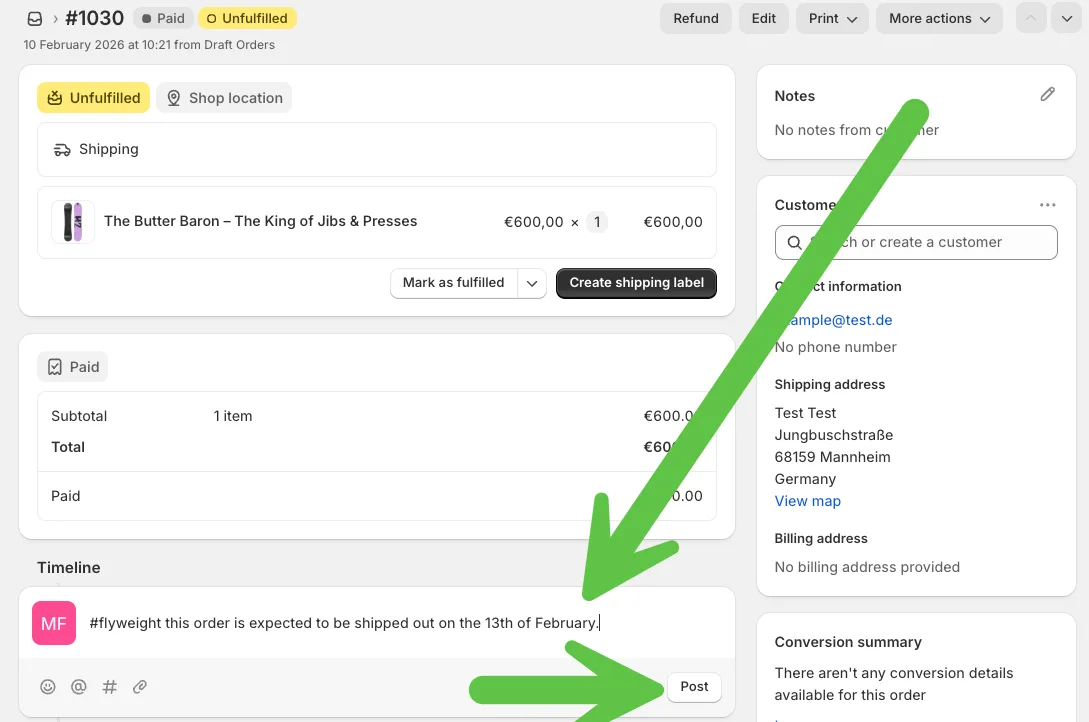
- Save
These comments are usually internal. But if you use the #flyweight tag, the information becomes immediately available to the AI.
So when the customer checks their order status again in chat, that extra shipping detail is automatically included in the response.
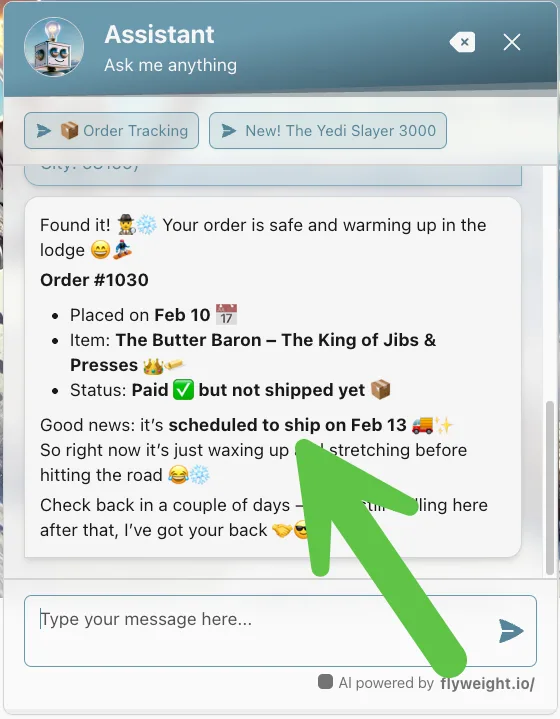
This helps with:
- Proactive communication
- Fewer support tickets
- More transparency
- A better customer experience
Why Additional Context Matters for Your Shopify AI Chatbot
An AI assistant is only as useful as the information it gets.
By combining:
- Well-structured public store content
- Strategic use of metafields
- Order-specific #Flyweight comments
your Flyweight AI chatbot becomes a real digital sales and support agent.
The result:
- More accurate responses
- Higher conversion rates
- Less manual support work
- Happier customers
Conclusion
With Flyweight AI, you get a powerful Shopify chatbot that keeps learning from your store.
If you:
- Keep your public content clean and structured
- Use the Flyweight Content metafield strategically
- Add order-specific details with #Flyweight
...you’ll get much more out of your AI assistant.
If you have questions or need help, reach out anytime.
We’re happy to help you make your AI assistant even better 🚀

 Ice Barrel
 STAY SPICED !
 Australian Bodycare
 Pullup & Dip
 Venen Engel
 VEYNOU